|

Best Medical Alert Systems for Seniors in 2025: 7 Options Compared

At 3 AM, my uncle fell in his bathroom. He’d been on the floor for six hours before his neighbor happened to stop by the next morning and heard him calling for help. Six hours.

The paramedics said if he’d had a medical alert system, they would have been there in minutes. The six-hour wait turned a simple fall into a three-week hospital stay and months of rehabilitation.

A dramatic nighttime scene outside a modern American home. A 70-year-old man lies on a medical gurney, being attended to by two paramedics before being loaded into a waiting ambulance with flashing lights. Nearby, a police car also has its lights flashing. Two worried individuals, a man and a woman in their nightwear, stand a short distance away on the front porch, observing the scene with concern. The overall atmosphere is urgent and somber

If you’re researching medical alert systems for your parent—or for yourself—you’re making one of the smartest safety decisions possible. These devices are literally lifesavers, giving seniors the independence to live at home while ensuring help is always one button-push away.

But with dozens of companies offering similar-sounding products, how do you choose? What features actually matter? And are the monthly fees worth it?

This guide breaks down the seven best medical alert systems for seniors available in 2025. We’ll give you a clear comparison of the top options, honest pros and cons, a full pricing breakdown, and the guidance you need to make an informed, confident decision.

What Is a Medical Alert System (And Who Needs One)?

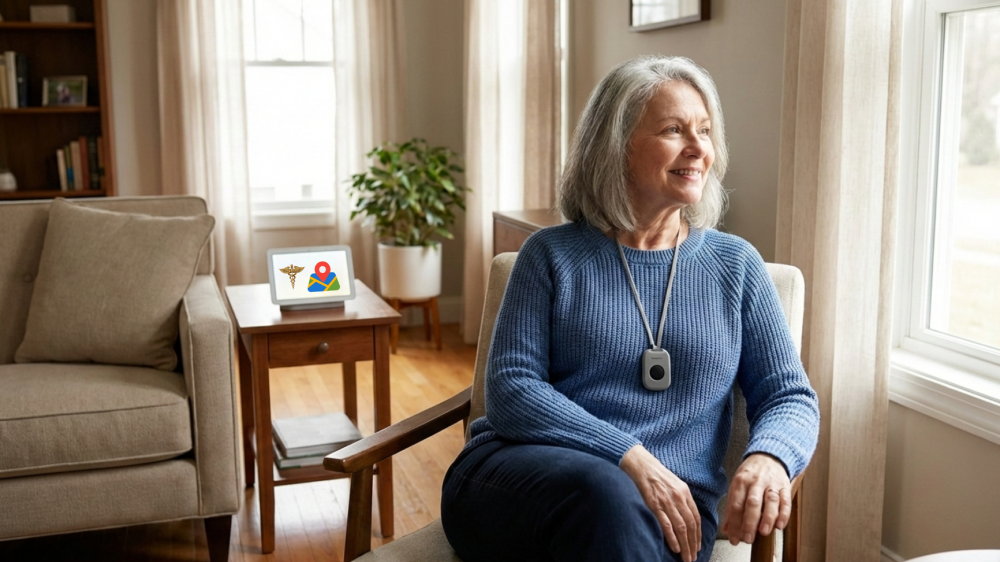
In simple terms, a medical alert system is a service that connects a person to emergency help 24/7. It typically consists of a wearable emergency button (worn as a pendant or wristband) and a base unit in the home that connects to a monitoring center. When the button is pressed, the user is instantly connected to a trained operator who can assess the situation, talk to the user, and dispatch 911 or call family members.

These systems are a lifeline for:

  • Seniors who live alone
  • Anyone with a high risk of falling
  • People with chronic health conditions like heart disease, COPD, diabetes, or seizure disorders
  • Seniors recovering at home after surgery or a hospital stay
  • Any person who wants the peace of mind that comes with knowing help is always available

If you’ve noticed any of the warning signs your parent can’t live alone safely, a medical alert system is a crucial and effective first step toward ensuring their safety.

Key Features to Look For

When comparing senior alert systems, it’s easy to get lost in the marketing jargon. Here are the features that truly matter.

Must-Have Features

  • 24/7 Professional Monitoring: This is non-negotiable. The alert should go to a center staffed with trained emergency operators, not just a pre-programmed call to a family member who might be busy or asleep.
  • Automatic Fall Detection: This is one of the most critical upgrades. Using accelerometers, these fall detection devices can sense a sudden fall and automatically send an alert, even if the user is knocked unconscious and can’t press the button.
  • Two-Way Communication: The ability to speak directly with the operator through the base unit or the wearable pendant itself is vital. It allows the user to explain what happened and allows the operator to provide reassurance while help is on the way.
  • Waterproof Design: Over 80% of senior falls happen in the bathroom. The wearable button must be fully waterproof (look for an IPX7 rating or higher) so it can be worn in the shower or bath.
  • Battery Backup: A power outage shouldn’t leave your loved one unprotected. A good system will have a battery backup in the base unit that lasts at least 24-32 hours.
  • Range: For at-home systems, this is the distance the wearable button can be from the base unit and still work. A range of 600-1,300 feet is typical and allows for coverage in the house, garage, and immediate yard.

Nice-to-Have Features

  • GPS Tracking: For mobile systems, GPS allows the monitoring center to pinpoint the user’s location anywhere in the country.
  • Medication Reminders: Some systems can be programmed to provide audible reminders for taking medications.
  • Activity Monitoring: For tech-savvy families, some systems have apps that allow you to passively check on a parent’s activity levels.
  • Lockbox for First Responders: Many companies offer a free or low-cost lockbox to store a house key, allowing paramedics to enter without breaking down the door.

The 7 Best Medical Alert Systems for 2025

Here is our medical alert systems comparison for 2025, based on features, reliability, and overall value.

A visually engaging graphic showcasing 'The 7 Best Medical Alert Systems for 2025.' Seven different modern medical alert devices, including wristbands, pendants, a smartwatch, and a portable speaker-like device, are arranged on individual white platforms against a softly blurred background of a modern living room. Text at the top reads 'The 7 Best Medical Alert Systems for 2025' and at the bottom, 'medical alert systems comparison based on features, reliability, and overall value

SYSTEM #1: Medical Guardian

Best for: Comprehensive coverage and top-rated customer service.

Medical Guardian consistently ranks at the top of medical alert reviews for its fast response times and excellent range of products, from simple at-home units to a sleek smartwatch.

  • Key Features: 24/7 professional monitoring, optional fall detection, mobile GPS systems (including a smartwatch), waterproof buttons, and a family app.
  • Pricing: Home systems start around $29.95/month. Mobile GPS systems start around 39.95/month.Theremaybeaone−timeequipmentfee(39.95/month.Theremaybeaonetimeequipmentfee(0-$125).
  • Pros:
    • ✅ Highly-rated U.S.-based customer service.
    • ✅ Consistently fast response times (under 45 seconds).
    • ✅ Wide variety of modern devices for home and mobile use.
    • ✅ No long-term contracts.
  • Cons:
    • ❌ Fall detection is an extra $10 per month.
    • ❌ Can have higher equipment fees than some competitors.

SYSTEM #2: Life Alert

Best for: Brand recognition and proven reliability.

Life Alert is the company that started it all with its famous “Help, I’ve fallen and I can’t get up!” commercials. They are known for their robust, proprietary systems and in-house monitoring.

  • Key Features: 24/7 monitoring, wall-mounted help buttons, optional mobile app with GPS, and monitoring for fire, smoke, and carbon monoxide.
  • Pricing: 50−50−70+ per month (varies by system). Pricing is not listed publicly. Equipment is included in the monthly fee.
  • Pros:
    • ✅ The oldest and most established brand in the industry.
    • ✅ Owns and operates its own monitoring centers.
    • ✅ Offers additional home safety monitoring services.
  • Cons:
    • ❌ One of the most expensive options on the market.
    • ❌ Requires a mandatory 3-year contract, which is a major drawback.
    • ❌ Opaque pricing requires you to call for a quote.

SYSTEM #3: Bay Alarm Medical

Best for: Budget-conscious buyers seeking affordability without sacrificing quality.

Bay Alarm Medical provides reliable service at one of the lowest starting price points in the industry, making it one of the best medical alert systems for seniors on a tight budget.

  • Key Features: 24/7 monitoring, optional fall detection, mobile GPS option, waterproof devices, and a choice of wearable styles.
  • Pricing: At-home systems start at just $24.95/month.
  • Pros:
    • ✅ Highly affordable monthly plans.
    • ✅ No long-term contracts and a 30-day trial period.
    • ✅ Consistently receives high marks for customer service (A+ BBB rating).
  • Cons:
    • ❌ Fewer premium features than more expensive brands.
    • ❌ Mobile and fall detection options increase the monthly cost.

SYSTEM #4: GetSafe

Best for: Tech-savvy seniors and families who want app-based monitoring.

GetSafe breaks the mold with a system that looks less like a medical device and more like a modern smart-home security system. It uses voice-activated wall buttons and a mobile app.

  • Key Features: Voice-activated and standard push-button options, activity monitoring through a family app, fall detection, and storage of medical profiles for first responders.
  • Pricing: Plans start around $29.95/month.
  • Pros:
    • ✅ Modern, discreet design that appeals to seniors who resist traditional pendants.
    • ✅ Family app provides peace of mind through activity tracking.
    • ✅ No long-term contracts required.
  • Cons:
    • ❌ As a newer company, it has a shorter track record.
    • ❌ Relies more heavily on tech, which may not suit all seniors.

SYSTEM #5: MobileHelp

Best for: Active seniors who travel or frequently leave home.

As its name suggests, MobileHelp specializes in GPS-based mobile systems. Their devices work anywhere in the U.S. with AT&T cellular coverage, making them perfect for active seniors.

  • Key Features: Nationwide GPS tracking, optional fall detection, two-way communication through the mobile device, and companion apps for caregivers.
  • Pricing: At-home systems start at $19.95/month, but their flagship mobile systems are around 37.95−37.95−41.95/month.
  • Pros:
    • ✅ Excellent mobile coverage that works across the entire U.S.
    • ✅ A great choice for seniors who are still driving, traveling, or very active.
    • ✅ No contracts and often no equipment fees.
  • Cons:
    • ❌ Fall detection costs extra.
    • ❌ Their core mobile products are more expensive than basic at-home systems.

SYSTEM #6: Philips Lifeline

Best for: Hospital-grade reliability and best-in-class fall detection.

Philips Lifeline is a name trusted by hospitals and healthcare professionals. Their AutoAlert fall detection is widely considered one of the most accurate and reliable in the industry.

  • Key Features: Superior AutoAlert fall detection technology, HomeSafe (landline or cellular), GoSafe (mobile GPS), and an optional automatic medication dispenser service.
  • Pricing: Plans range from $29.95/month for a basic system to $49.95/month for the HomeSafe with AutoAlert. There is often an activation or equipment fee.
  • Pros:
    • ✅ Medical-grade quality and reliability from a global healthcare leader.
    • ✅ Excellent and highly-trusted fall detection technology.
    • ✅ Offers a valuable medication management service add-on.
  • Cons:
    • ❌ Higher upfront equipment and activation costs than many competitors.
    • ❌ Monthly fees are in the mid-to-high range.

SYSTEM #7: LifeFone

Best for: Reliable, traditional at-home monitoring with U.S.-based operators.

LifeFone is a long-standing, reputable company that offers solid, no-frills service with a lifetime equipment guarantee and highly transparent pricing.

  • Key Features: 24/7 U.S.-based monitoring centers, optional fall detection, waterproof devices, free spousal monitoring, and an optional lockbox.
  • Pricing: At-home systems start at $24.95/month. The same system with fall detection is $32.95/month.
  • Pros:
    • ✅ Guarantees all monitoring operators are U.S.-based.
    • ✅ Very affordable and transparent pricing with no hidden fees.
    • ✅ Offers a lifetime equipment warranty and a 30-day money-back guarantee.
  • Cons:
    • ❌ Their mobile options are less advanced than competitors like MobileHelp.
    • ❌ Best suited for seniors who primarily stay at home.

Comparison Table

SystemAvg. Monthly CostFall DetectionMobile GPS OptionContract
Medical Guardian$29.95+Extra $10/moYesNo
Life Alert50−50−70+IncludedYes3 Years
Bay Alarm Medical$24.95+Extra $10/moYesNo
GetSafe$29.95+IncludedYesNo
MobileHelp$19.95+Extra $10/moYesNo
Philips Lifeline$29.95+Extra ~$15/moYesNo
LifeFone$24.95+Extra $8/moYesNo

How to Choose the Right System

To find the best medical alert system for your loved one, ask yourself these key questions:

  1. Is their life centered at home, or are they active outside?
    If they spend most of their time at home, a traditional at-home system is more affordable and perfectly adequate. If they still drive, shop, and travel, a mobile system with GPS is essential.
  2. Is fall detection necessary?
    If your parent has a history of falls, mobility issues, dizziness, or lives alone, the answer is an emphatic YES. The extra $10 a month is worth every penny for the protection it provides during an incapacitating fall.
  3. What is the budget?
    For the tightest budgets, Bay Alarm Medical offers incredible value. For a great balance of features and price, Medical Guardian and LifeFone are excellent mid-range choices. If you want premium features and reliability and budget is less of a concern, consider Philips Lifeline.
  4. How comfortable are they with technology?
    For a traditional senior who wants a simple, no-fuss button, LifeFone or Bay Alarm are great. For a more tech-savvy individual who would appreciate a modern design and a family app, GetSafe is a fantastic choice.

Common Questions About Medical Alert Systems

Q: Will Medicare pay for this?
A: Unfortunately, Original Medicare (Part A and B) does not cover medical alert systems. However, some private Medicare Advantage (Part C) plans offer them as a supplemental benefit. You must check your specific plan’s details.

Q: What if my parent refuses to wear it?
A: This is a common hurdle. Try letting them choose the style (pendant vs. wristband), explaining that it actually preserves their independence by keeping them safe at home longer, and framing it as a gift that gives you peace of mind.

Q: How fast is the response time?
A: Most top companies average between 20 and 60 seconds from the moment the button is pressed to a live operator speaking. From there, emergency services can be dispatched in minutes.

Q: Do they work during a power outage?
A: Yes. All reputable at-home systems have a built-in backup battery that will keep the system running for 24-32 hours during a power outage.

Conclusion

A medical alert system is one of the smartest and most affordable investments you can make in a parent’s safety and your own peace of mind. For less than the cost of a daily cup of coffee, you ensure that help is always just a button press away.

While all seven systems on this list are effective, the best choice depends on your specific needs. For most seniors, Medical Guardian and Bay Alarm Medical offer the best overall balance of features, reliability, and price. For the most active seniors, MobileHelp is the clear winner. And for those seeking medical-grade fall detection, Philips Lifeline remains the gold standard.

Ultimately, the most important step is choosing one and ensuring it’s used correctly. The best medical alert system for seniors is the one they will actually wear. That monthly fee is a small price to pay for safety, and the independence it provides is priceless.


CONTINUE YOUR RESEARCH:

Similar Posts

One Comment

Leave a Reply

Your email address will not be published. Required fields are marked *